

Allen-Bradley ControlLogix Troubleshooting: Resolving EtherNet/IP Communication Failures with Studio 5000
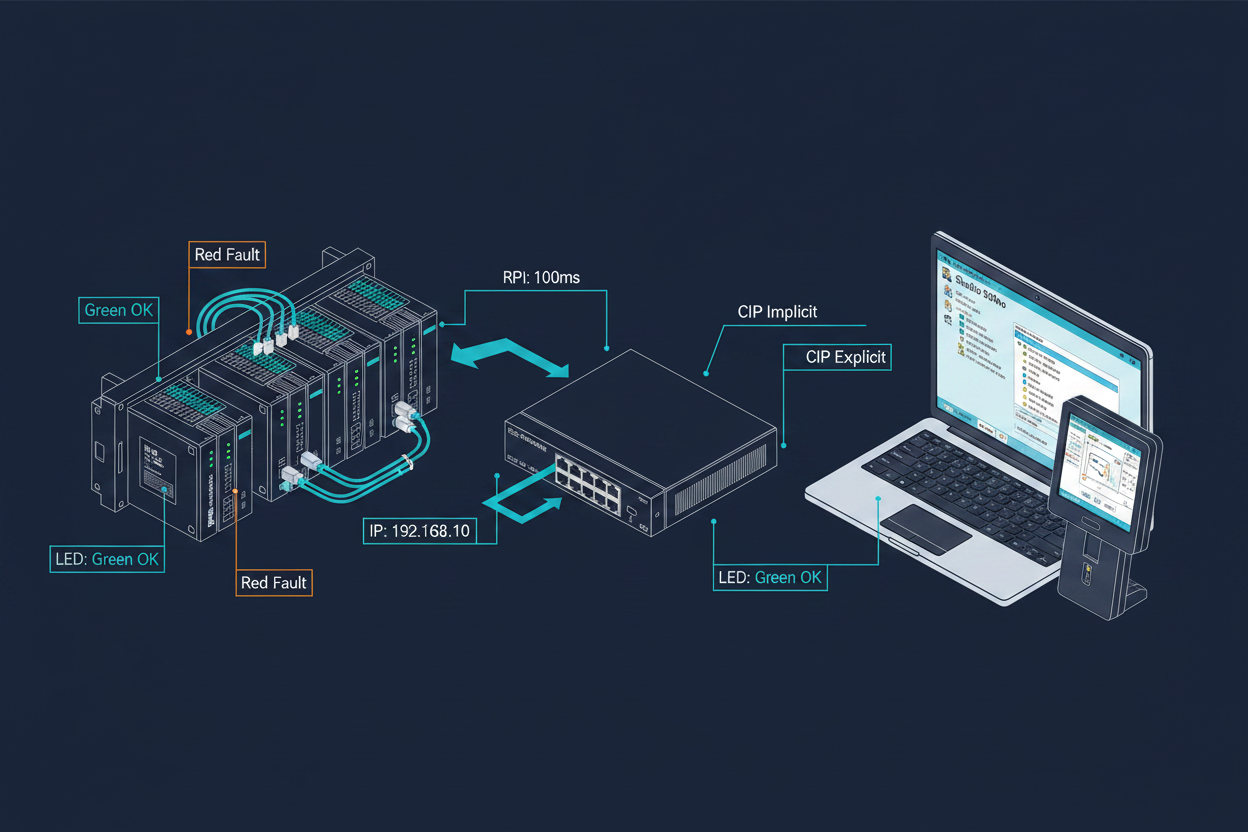
ControlLogix EtherNet/IP Architecture Overview
Allen-Bradley ControlLogix controllers from Rockwell Automation dominate industrial automation applications worldwide. The platform supports EtherNet/IP for communication with HMIs, other controllers, and distributed I/O modules. EtherNet/IP operates on the Common Industrial Protocol (CIP) foundation. It provides both implicit (real-time I/O) and explicit (message-based) communication.
The 1756-ENBT and 1756-EN2T EtherNet/IP bridge modules connect ControlLogix chassis to plant networks. These modules support 10/100 Mbps Ethernet with auto-negotiation. The latest 1756-EN3TR module supports gigabit speeds. Understanding the module specifications helps engineers select appropriate hardware for their application bandwidth requirements.
Common ControlLogix communication problems include connection timeouts, data type mismatches, and RPI (Requested Packet Interval) configuration errors. Systematic diagnosis using Rockwell's built-in tools resolves most issues quickly.
Studio 5000 EtherNet/IP Configuration Steps
Step 1: Open Studio 5000 Logix Designer and create or open your project. Navigate to the Controller Organizer and expand the Controller folder to locate the EtherNet/IP module.
Step 2: Right-click on the EtherNet/IP module and select Properties. Verify the IP address matches your network plan (e.g., 192.168.1.10 for the primary controller).
Step 3: Configure the module connection parameters. Set the Connection Parameters including the assembly instance numbers. For explicit messaging, use connection type "Null" or "Point-to-Point." For I/O data exchange, use "Owner" or "Listen-Only" connection types.
Step 4: Set the Requested Packet Interval (RPI) appropriately. For high-speed applications, use 10–50 ms. For standard monitoring, 100–500 ms provides adequate performance. Lower RPI values increase network traffic and controller overhead.
Step 5: Configure the CIP Safety settings if using safety I/O modules. Enable the Safety Network Number (SNN) and verify it matches the safety partner module configuration.
Step 6: Download the project to the controller. After download, go online and verify the module shows "OK" status in the Controller Scope window.
Step 7: Test data exchange by monitoring the tags in the Logic Analyzer. Verify that input data updates at the expected RPI rate. Check for any connection fault indicators (red LED on module).
Diagnosing ControlLogix Ethernet Communication Faults
When ControlLogix communication fails, the first diagnostic step is checking module LED indicators. A steady green LED indicates normal operation. Flashing green shows active communication. A red LED indicates a fault condition. No lights suggest power or hardware failure. Document the LED pattern before proceeding with further troubleshooting.
Second, use the RSWho (Who Active) browser in Studio 5000 to discover devices on the EtherNet/IP network. Right-click on the Ethernet network and select "Who Active." The browser displays all connected devices with their IP addresses and status. A device missing from the browser indicates network connectivity problems.
Third, verify the electronic keying in module properties. Electronic keying prevents mismatched device types causing communication failures. If replacing a module, ensure the new module has compatible electronic keying parameters. The revision, major and minor fault type must match the project configuration.
However, excessive network traffic causes communication timeouts even when physical connections are correct. Use Wireshark or Rockwell's Network Diagnostics tool to capture EtherNet/IP traffic. High traffic loads on the plant network segment can degrade communication performance. Implement VLANs to separate I/O traffic from operator traffic.
Practical Case: Fixing PanelView Plus Communication with ControlLogix
A common field issue involves PanelView Plus HMIs losing communication with ControlLogix controllers. In one petrochemical plant, operators reported frequent HMI disconnections every 15–30 minutes. The maintenance team replaced Ethernet cables and switches without resolving the issue.
First investigation revealed the RPI setting on the HMI connection was too aggressive. The 2711P-RT7P PanelView Plus was configured with 10 ms RPI while the plant network experienced heavy traffic during certain operations. Increasing the RPI to 100 ms reduced communication overhead significantly.
Second, the controller tag structure used incorrectly formatted UDT (User Defined Data Type) references. The HMI attempted to access array elements beyond the defined bounds. Restructuring the tag database to use linear arrays instead of nested UDTs resolved the data access errors.
Third, firmware version mismatch between the PanelView Plus and Studio 5000 project caused compatibility issues. Upgrading the HMI firmware to match the controller firmware version eliminated the remaining communication problems. After these changes, the HMI maintained stable communication throughout extended operation periods.
Conclusion and Action Advice
ControlLogix EtherNet/IP troubleshooting requires systematic diagnosis of network, configuration, and firmware factors. Always start with physical layer verification before diving into protocol-level analysis. Use Studio 5000's built-in diagnostic tools to identify configuration mismatches quickly.
Document all configuration changes in your project and maintain backup copies of controller projects. Implement network monitoring to establish baseline traffic patterns. This practice enables quick identification of anomalies. Regular firmware updates keep systems stable and secure. Finally, coordinate with IT departments for network infrastructure issues beyond the automation system scope.
Author: Li Ming is a senior automation engineer with 15 years of experience in Rockwell Automation platforms including ControlLogix, CompactLogix, and PlantPAx distributed control systems.


