

OPC Server Connected but Tags Frozen: Kepware and Allen-Bradley EtherNet/IP Field Fixes
Why a Green Connection Hides a Dead Data Path?
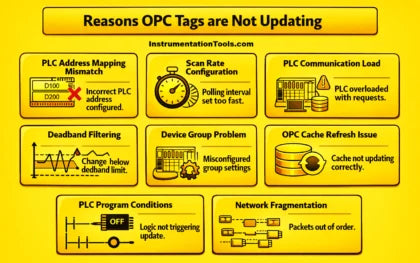
OPC servers bridge controllers and upper layers. They feed SCADA, HMIs, and historians. The classic symptom appears on night shift. The server status reads connected. Yet several tags sit frozen at their last value. First, understand the failure class. The transport link is alive. The data path is not. Therefore, resist the urge to restart the server. Restarting hides the root cause and it returns within days. In my Kepware and Allen-Bradley plants, eight causes explain nearly every case. Work them in order.
How to Verify PLC Address Mapping After Any Online Edit?
Address drift is the number one cause. Engineers modify ControlLogix logic during commissioning or optimization. They move tags, resize arrays, and change data types. The Kepware tag database stays behind. The driver keeps polling a register that logic no longer writes. The tag freezes with good quality, which is the trap. However, the quality flag often stays good because the register still exists. Check the mapping directly.
- Step 1 — Export the ControlLogix tag database from RSLogix 5000 and compare it against the Kepware address strings.
- Step 2 — Force-read the exact tag online in the controller. Compare it with the timestamp in OPC Quick Client.
- Step 3 — Re-import tags from the controller symbolic file. Never retype addresses by hand.
How to Tune Scan Rates and Deadband on Analog Loops?
Aggressive polling saturates the CIP path. Each Kepware device opens a CIP connection to the ControlLogix processor. A Logix controller supports a limited number of CIP connections, often around 40 for standard processors. Multiple clients plus a fast scan rate exhaust that budget. The processor delays or drops requests. Moreover, deadband filtering hides real movement. A 2 percent deadband on a slow temperature loop suppresses genuine small changes. The value in the PLC moves, but the client never hears about it.
- Step 1 — Set the Kepware update rate to 1000 ms for analog process tags. Use 100 ms only for fast interlocks.
- Step 2 — Set the deadband below 0.5 percent of span for critical analog tags. Disable it entirely for totalizers.
- Step 3 — Check the CIP connection count on the controller. Split large device groups if the count nears the limit.
What Should I Check Regarding Device Groups, Cache, and OPC UA Subscriptions?
Kepware organizes devices into channels and groups. A wrong backplane slot, wrong processor slot, or wrong IP kills only that group. Tags in other groups keep updating. Therefore, a partially frozen screen often points to one broken device object. The cache adds another layer. The server reads the PLC on its own cycle and serves clients from cache. If driver delays stall the cache refresh, clients receive old values while the link reads healthy. For OPC UA clients, confirm the endpoint. Use opc.tcp on port 4840 with a trusted application certificate. Check that the subscription publishing interval sits at or above the sampling interval.
- Step 1 — Open the Kepware event log. Filter for the specific device and look for CIP errors or timeout codes.
- Step 2 — Verify slot addressing in the device properties against the actual backplane configuration.
- Step 3 — Watch the diagnostics counters. Stale reads with rising request failures indicate cache starvation.
How Do PLC Logic and Packet Fragmentation Affect Tag Updates?
Some variables only update under program conditions. Batch sequences, interlocks, and state machines gate many writes. If the condition never fires, the register holds its last value. The OPC server reports it faithfully. This looks like a communication fault but is not. Therefore, read the logic before touching the network. Finally, check fragmentation. Large block reads over EtherNet/IP can exceed frame limits on congested networks. Late or out-of-order fragments break the reassembly window. Split oversized tag blocks into smaller reads. Keep block reads under 480 bytes where possible.
- Step 1 — Trace the rung that writes the frozen tag. Confirm the enable condition actually fires.
- Step 2 — Break large Kepware block reads into groups under 100 tags each.
- Step 3 — Monitor the switch port for CRC errors and retransmissions during the fault window.
Conclusion & Action Advice
Frozen tags on a green OPC link are a configuration or load problem, not a cable problem. First, reconcile the tag database after every controller edit. Second, keep scan rates honest and deadbands tight. Moreover, watch CIP connection budgets and device group health before blaming the network. Therefore, build a weekly habit of exporting the Kepware event log and archiving tag mappings with each program revision. Finally, train juniors to read quality codes and timestamps before they touch anything. A disciplined check sequence clears most frozen-tag faults in under an hour, without a reboot, and keeps your historian trustworthy.
Author: Zhou Weiguo is an industrial automation engineer with over 10 years of experience in PLC, DCS, and control systems.


